M05.01 - Introduction to Networking
Thuật ngữ networking đề cập đến các devices được kết nối với nhau có thể exchange data và resources. Networking trong AWS Cloud bao gồm infrastructure và services làm việc cùng nhau để host applications, data, và bất kỳ resources nào khác bạn có thể cần. Hãy bắt đầu và tìm hiểu về các foundational network components được sử dụng trong AWS Cloud.
Mục tiêu học tập
Sau khi hoàn thành bài học này, bạn sẽ có thể:
- ✅ Mô tả Amazon Virtual Private Cloud (VPC) là gì và nó làm gì
- ✅ Mô tả subnet là gì và nó làm gì
- ✅ Mô tả sự khác biệt giữa public và private subnet
- ✅ Hiểu về network diagrams và cách đọc chúng
- ✅ Hiểu mối quan hệ giữa AWS Cloud, Regions, VPCs, và Availability Zones
Coffee Shop Analogy: Networking
Có vẻ như mọi thứ đang thực sự tiến triển trong coffee shop của chúng ta. Tuy nhiên, chúng ta đã có một số customers háo hức đi full steam ahead và hét orders của họ tại baristas! Tsk tsk.
Họ nên politely asking cashiers thay vì. Điều này thực sự đưa ra một điểm thú vị, tuy nhiên. Nó chỉ không có ý nghĩa để allow mọi customer có thể interact với baristas ở phía sau. Sau tất cả, baristas của chúng ta cần stay focused trên crafting caffeinated beverages. Vì vậy, chúng ta làm gì?
Chúng ta cần limit access đến baristas, và let customers interact chỉ với cashiers của chúng ta. Và wouldn't you know it, chúng ta có thể sử dụng AWS networking để accomplish điều đó. Cụ thể, một networking concept được gọi là Amazon Virtual Private Cloud, hoặc VPC.
Amazon Virtual Private Cloud (Amazon VPC)
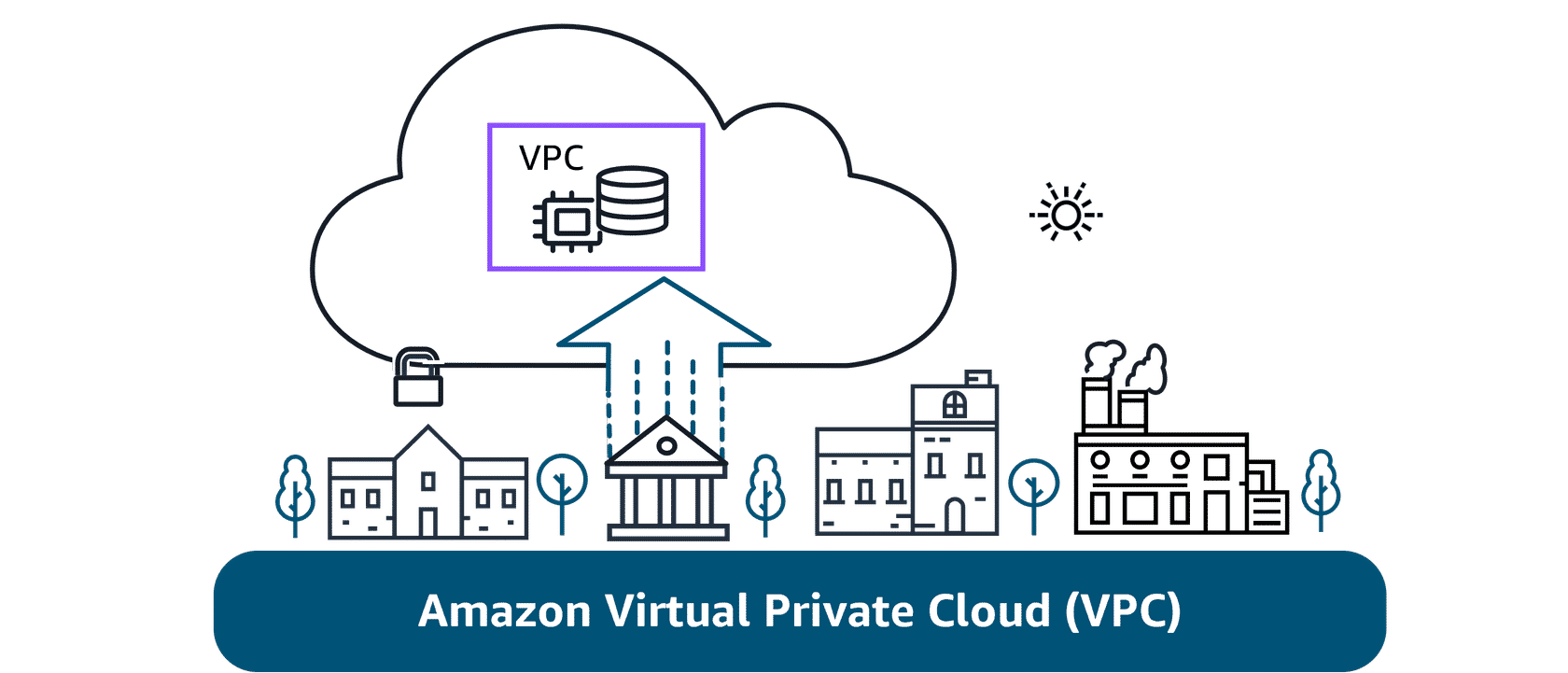
VPCs help bạn provision một logically isolated section của AWS Cloud.
Định nghĩa
An Amazon VPC lets bạn provision một logically isolated section của AWS Cloud nơi bạn có thể launch AWS resources trong một virtual network mà bạn define.
Trong virtual network này, bạn có thể launch bất kỳ resources nào bạn quyết định. Quan trọng hơn, các resources này có thể là public hoặc private.
Public vs Private Resources
- Public-facing resources: Có access đến internet
- Private resources: Không có internet access
Ví dụ với Coffee Shop:
- Cashiers (Public): Chúng ta có thể make cashiers publicly-accessible để họ có thể interact với customers của chúng ta để take orders và process payments
- Baristas (Private): Chúng ta có thể then prevent customers từ interacting directly với baristas bằng cách making chúng private resources. Điều này có nghĩa là, hey, tôi có thể focus trên making drinks! Ahhhhh, refreshing.
Subnets
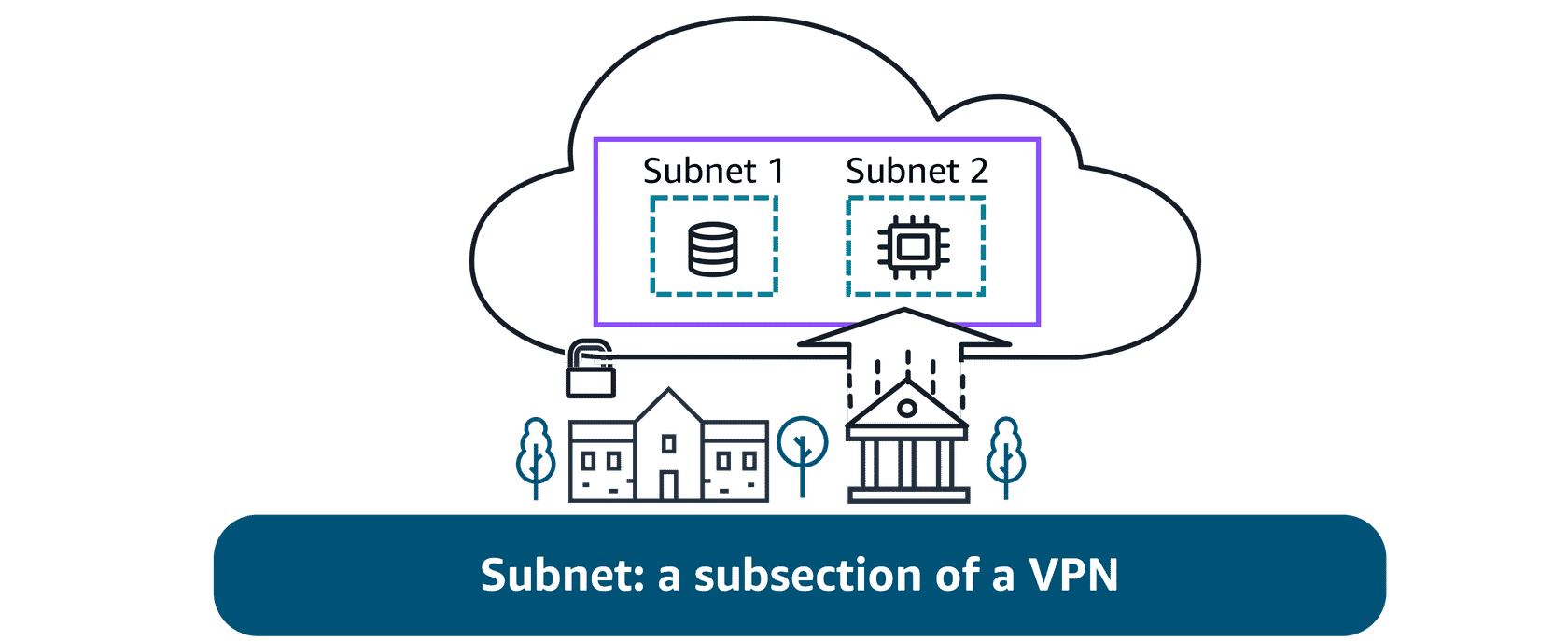
Subnets được sử dụng để organize resources của bạn và có thể được make publicly hoặc privately accessible.
Định nghĩa
Subnets là essentially segments của VPC của bạn, allowing bạn để divide VPC của bạn thành smaller, manageable sections. A subnet là một range của IP addresses trong VPC của bạn.
Public Subnets
Public subnets được designed để provide direct internet access đến resources placed bên trong chúng. Để allow access, chúng được connected với một internet gateway. Bạn sẽ học thêm về internet gateways trong một bài học sau.
Use cases:
- 🌐 Customer-facing websites - Các trang web hướng đến khách hàng
- 🖥️ Web servers - Máy chủ web
- 📱 Public APIs - API công khai
Private Subnets
Private subnets được designed để isolate resources mà không nên được directly exposed đến public internet.
Use cases:
- 💾 Databases storing customer hoặc transactional information
- 🔒 Backend services - Các dịch vụ backend
- 🛡️ Internal resources - Tài nguyên nội bộ
Trong diagrams, private subnets được illustrated với solid boxes.
Networking Components: Understanding Connections through Diagrams
Nếu bạn mới với IT hoặc cloud computing, bạn có thể chưa làm việc với architectural diagrams trước đây. A diagram là, simply put, một schematic hoặc map của network của bạn trong AWS Cloud. Nó có thể provide một visual của cách users hoặc applications access services, resources, hoặc data.
A picture is worth a thousand words. Với một quick glance, bạn có thể see nếu network được built cho redundancy, security, và even scalability. Nó cũng có thể serve như một blueprint để bạn không forget important connections khi building solutions của bạn.
Understanding Network Diagrams
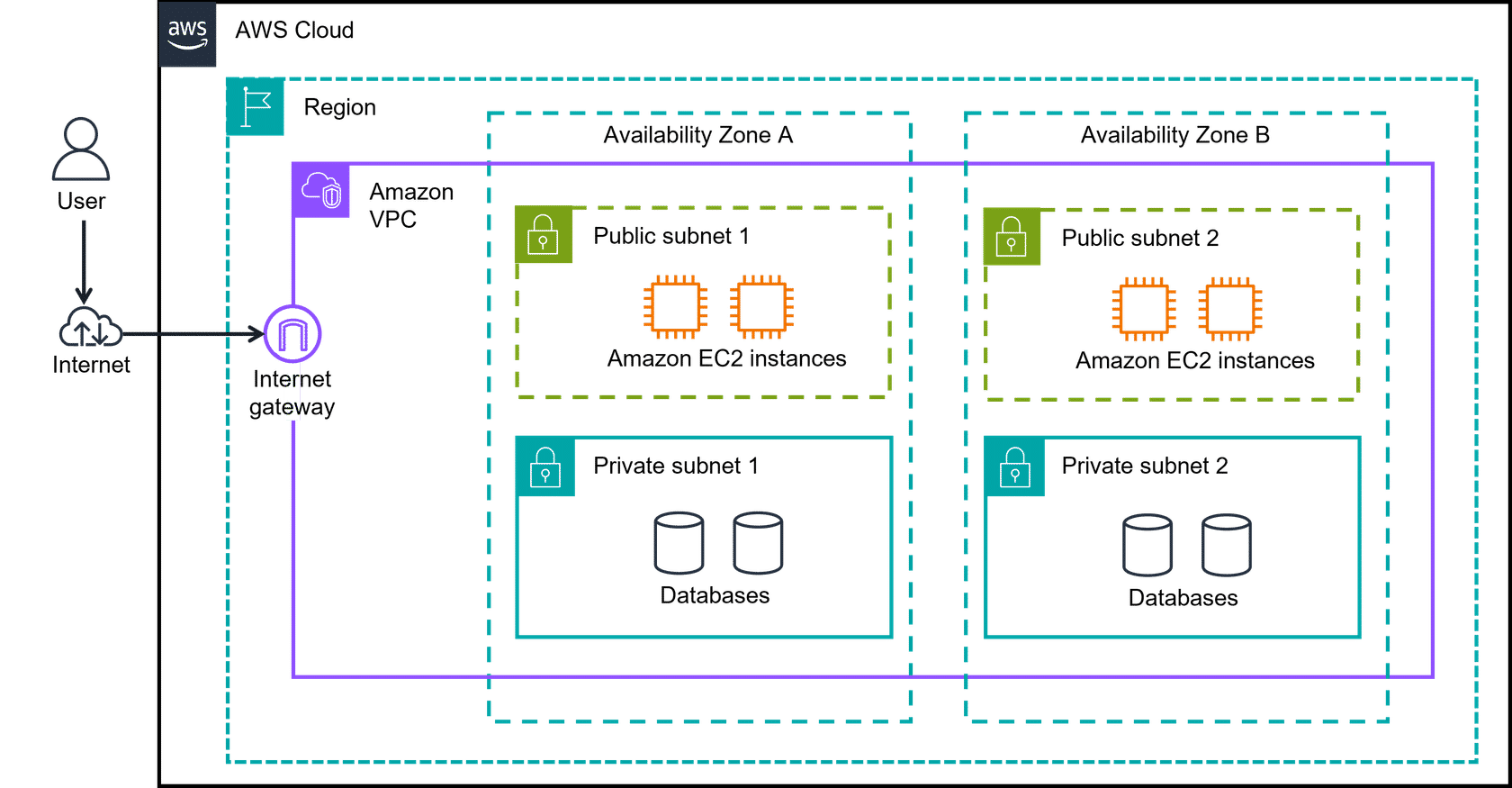
Diagram Basics 1: AWS Cloud, Regions, Amazon VPC, và AZs
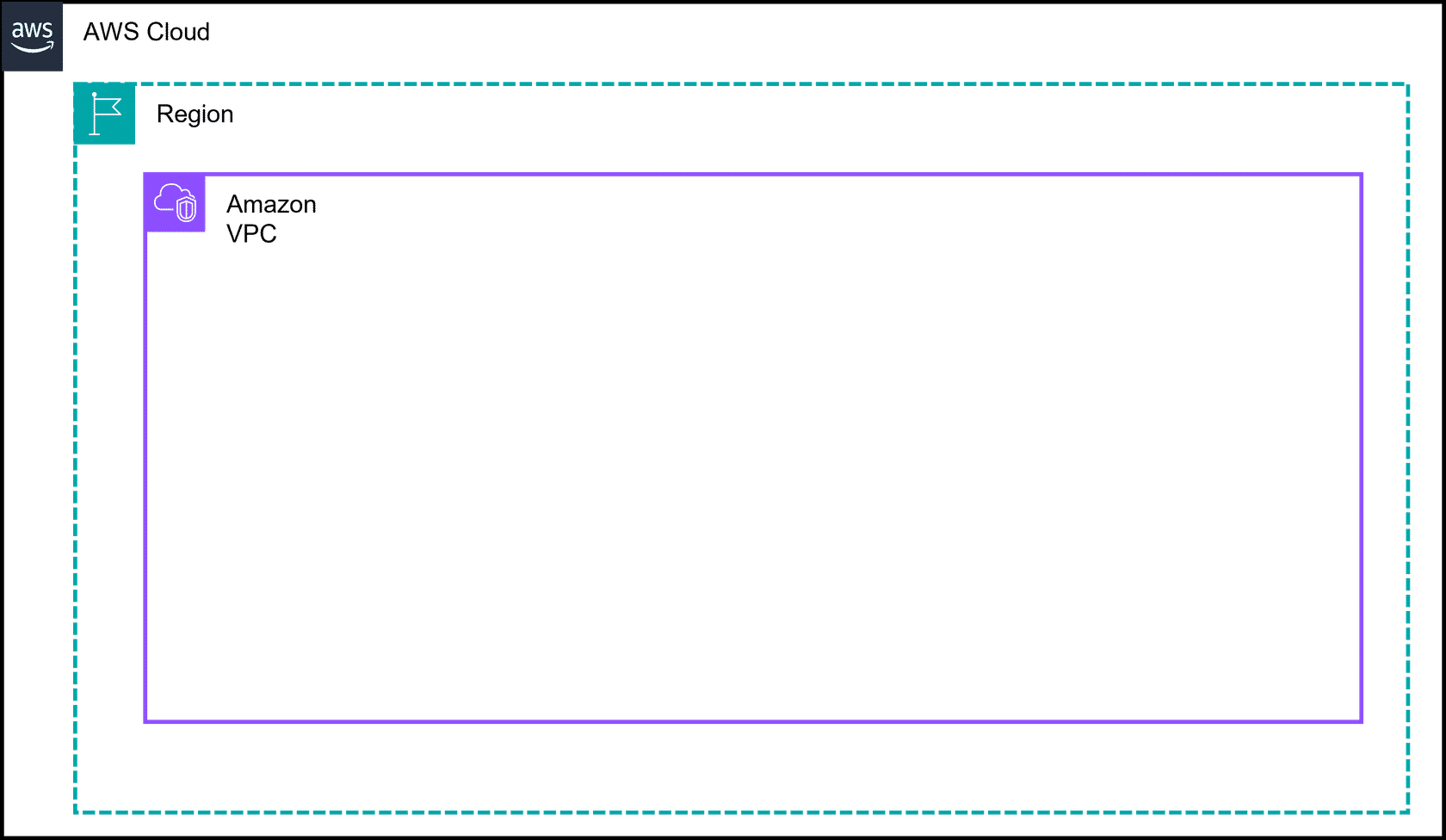
AWS Cloud:
- AWS Cloud là outermost box trong hầu hết diagrams
- Represents toàn bộ AWS infrastructure
Region:
- Region là next box
- AWS Regions là separate geographic areas
- Bạn choose Region của bạn dựa trên:
- Users' geographic location cho lower latency
- Compliance và data residency requirements
- Available services
- Cost
Amazon VPC:
- Amazon VPC là một solid box, và nó represents isolated, logically segmented network của bạn within AWS
- A VPC helps bạn control network resources và security của bạn
Availability Zones:
- Availability Zones được shown như separate boxes across một region
- AZs consist of one or more discrete data centers, mỗi với redundant power, networking, và connectivity, và housed trong separate facilities
- Sử dụng multiple AZs có thể protect applications của bạn từ failure của một single location trong Region
Diagram Basics 2: Private Subnets
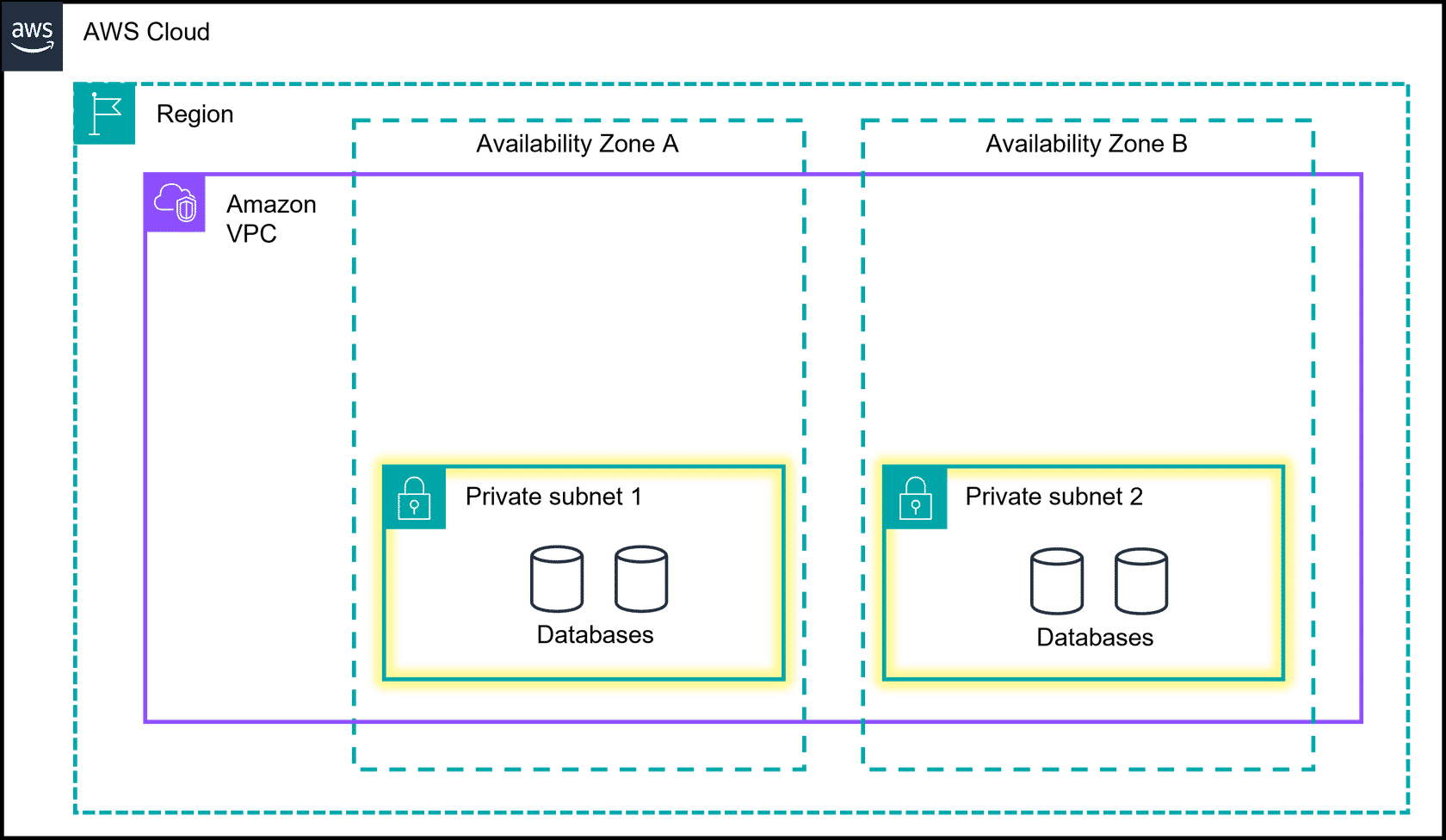
Private Subnets:
- Subnets là essentially segments của VPC của bạn, allowing bạn để divide VPC của bạn thành smaller, manageable sections
- A subnet là một range của IP addresses trong VPC của bạn
- Private subnets được designed để isolate resources mà không nên được directly exposed đến public internet
- Trong diagrams, chúng được illustrated với solid boxes
Diagram Basics 3: Public Subnets
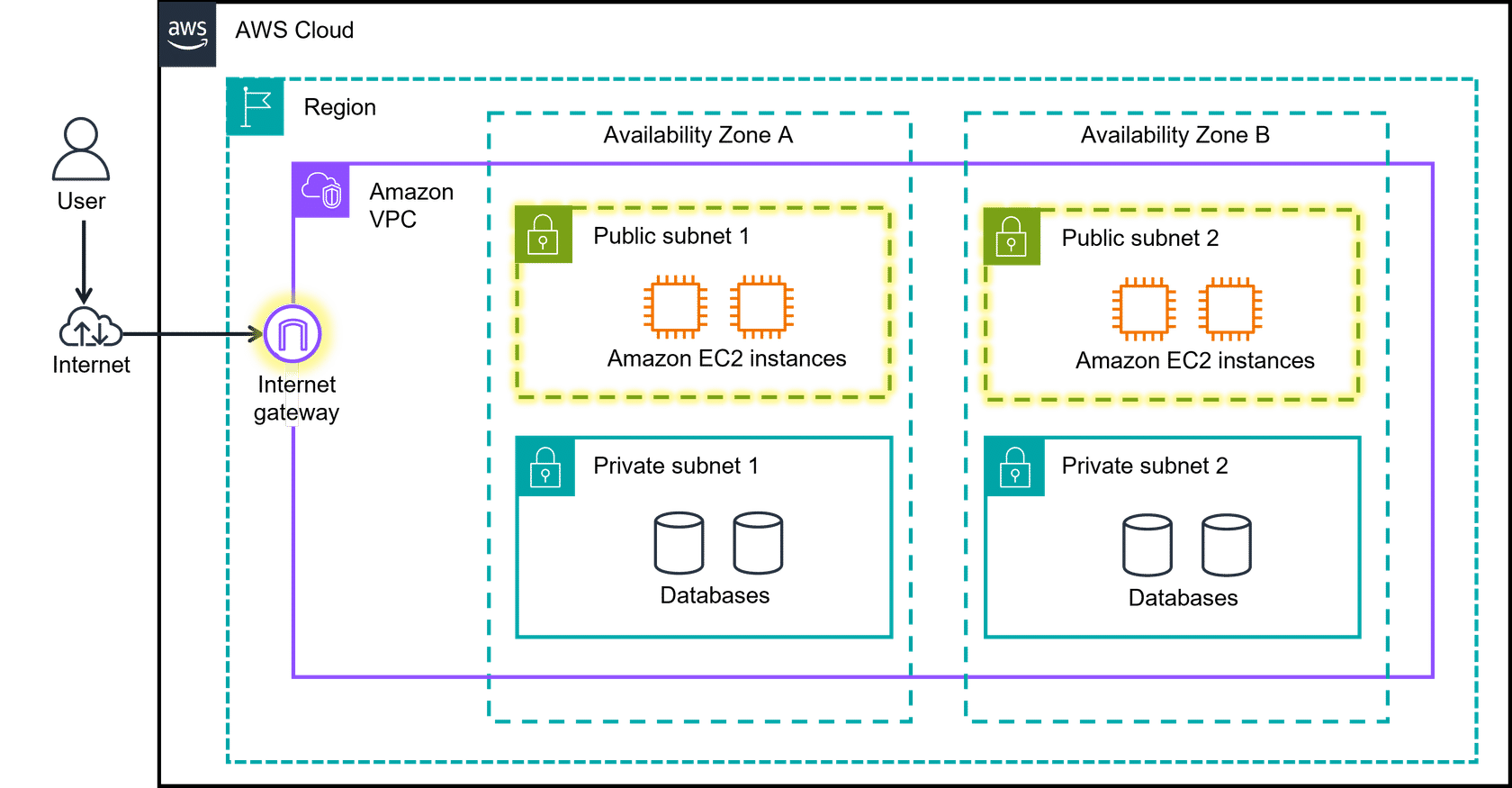
Public Subnets:
- Public subnets được designed để provide direct internet access đến resources placed bên trong chúng
- Để allow access, chúng được connected với một internet gateway
- Trong diagrams, public subnets được drawn với dashed boxes
Mối quan hệ giữa các Components
Hierarchical Structure:
- AWS Cloud (Outermost) - Toàn bộ AWS infrastructure
- Region - Geographic area
- Amazon VPC - Logically isolated network (Solid box)
- Availability Zones - Separate boxes across region
- Subnets - Segments của VPC
- Public Subnets (Dashed boxes) - Internet access
- Private Subnets (Solid boxes) - No direct internet access
Visual Cues trong Network Diagrams
Dashed vs Solid Lines:
- Dashed boxes: Publicly accessible hoặc logical grouping (AWS Cloud, Region, Availability Zones, Public Subnets)
- Solid boxes: Logically isolated hoặc private (Amazon VPC, Private Subnets)
Padlock Icons:
- Unlocked padlock: Public subnet
- Locked padlock: Private subnet
Arrows:
- Show flow của network traffic hoặc connections
Tóm tắt
Trong bài học này, bạn đã học về:
- ✅ Networking: Interconnected devices có thể exchange data và resources
- ✅ Amazon VPC: Logically isolated section của AWS Cloud nơi bạn launch AWS resources
- ✅ Subnets: Segments của VPC để organize resources
- ✅ Public Subnets: Provide direct internet access (Dashed boxes)
- ✅ Private Subnets: Isolate resources từ public internet (Solid boxes)
- ✅ Network Diagrams: Visual representations của network architecture
- ✅ Hierarchical Structure: AWS Cloud → Region → VPC → Availability Zones → Subnets
Test Your Skills
What are the uses of a subnet in an Amazon VPC? (Select THREE.)
Các công dụng của subnet trong Amazon VPC là gì? (Chọn BA.)
📋 Xem các lựa chọn
- Can be used to share public resources
- Có thể được sử dụng để chia sẻ tài nguyên công cộng
- Can be used to organize your resources
- Có thể được sử dụng để tổ chức tài nguyên của bạn
- Can be used to provide high availability because they consist of one or more discrete data centers
- Có thể được sử dụng để cung cấp tính sẵn sàng cao vì chúng bao gồm một hoặc nhiều trung tâm dữ liệu riêng biệt
- Can provide a centralized interface for accessing and managing various AWS resources and services
- Có thể cung cấp giao diện tập trung để truy cập và quản lý các tài nguyên và dịch vụ AWS khác nhau
- Can be used to isolate resources and keep them private
- Có thể được sử dụng để cách ly tài nguyên và giữ chúng ở chế độ riêng tư
- Can be used as an on-demand and scalable computing capacity in the AWS Cloud
- Có thể được sử dụng như một năng lực tính toán theo yêu cầu và có thể mở rộng trong AWS Cloud
✅ Đáp án đúng
Đáp án đúng:
- ✅ Can be used to share public resources (Có thể được sử dụng để chia sẻ tài nguyên công cộng)
- ✅ Can be used to organize your resources (Có thể được sử dụng để tổ chức tài nguyên của bạn)
- ✅ Can be used to isolate resources and keep them private (Có thể được sử dụng để cách ly tài nguyên và giữ chúng ở chế độ riêng tư)
Giải thích:
✅ Subnets được sử dụng để organize resources của bạn trong Amazon VPC. Chúng cho phép bạn chia VPC thành các sections nhỏ hơn, có thể quản lý được.
✅ Public subnets có thể được sử dụng để share public resources như web servers hoặc customer-facing websites, cho phép chúng có direct internet access.
✅ Private subnets có thể được sử dụng để isolate resources và keep chúng private, như databases hoặc backend services, không directly exposed đến public internet.
Các lựa chọn không đúng:
- ❌ "Provide high availability because they consist of one or more discrete data centers": Đây là mô tả của Availability Zones, không phải Subnets
- ❌ "Centralized interface for accessing and managing AWS resources": Đây là mô tả của AWS Management Console
- ❌ "On-demand and scalable computing capacity": Đây là mô tả của Amazon EC2, không phải Subnets
Next Steps
Trong các bài học tiếp theo, bạn sẽ:
- Tìm hiểu về Internet Gateway
- Khám phá Security Groups và Network ACLs
- Học cách thiết kế network architecture cho high availability
- Tìm hiểu về các networking services khác của AWS
Hãy tiếp tục với bài học tiếp theo để tìm hiểu sâu hơn về AWS Networking! 🌐